Rule of thirds on iPhone and Android
The rule of thirds is the first composition rule most photographers learn, and the easiest to use on a phone. Split the frame into a 3 × 3 grid and put the important things on the lines or where they cross.
Turn on your camera's grid
- iPhone: Settings › Camera › turn on Grid. The Camera app then shows the 3 × 3 lines. Turn on Level in the same place to see when the phone is straight.
- Android: open the camera's settings (the gear icon) and look for Grid lines. The name and place differ by phone maker, but almost every camera app has it.
Put the subject on a power point
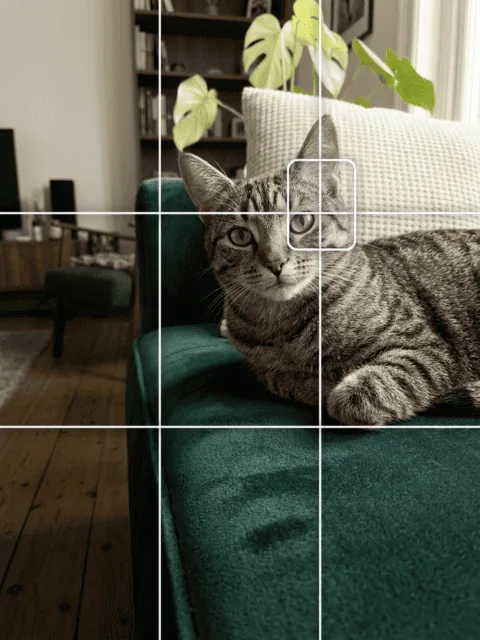
The four places where the lines cross are often called power points. Put your subject, or the most important part of it, on one of them. Which one? Usually the one that leaves space in the direction the subject faces or moves.
In Beginner Cam, the Rule of thirds guide marks a subject box on one crossing. Tap the selected guide again to move it to the next crossing, so you can match the side your subject is on.



Use the lines, too
- Horizons go on the lower line (big sky) or the upper line (more ground), not through the middle.
- Eyes in a portrait sit near the upper line.
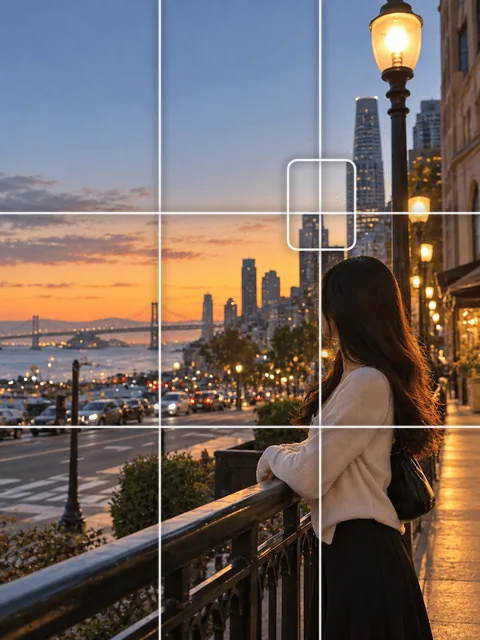
- Tall things such as a tower, a tree or a standing person can follow a vertical line.

Common mistakes
- Subject facing the edge. Leave the space in front of the face or the direction of movement, not behind it.
- Cutting people at the joints. If the frame cuts a person, cut between joints (mid-thigh, mid-arm), not at the knees, ankles or wrists.
- Forcing it. Symmetrical scenes, faces looking straight at you and reflections often look better centered. The rule of thirds is a starting point, not a law.
- A tilted horizon. Use the level; a crooked line is more noticeable than an off-center subject.
Rule of thirds or golden ratio?
The golden ratio puts the lines a little closer to the middle (about 38% and 62% instead of 33% and 67%). The difference is small on a phone screen. See golden ratio vs rule of thirds.